Technology
Web Technologies
Siegrist Chantal & Hinze Gabriel
Intro
Websites
are sources of all kinds of information in which one can search. Any entity or firm
today has its own and there are more than 1.25 billions to be online. They vary
over their content, layout, purpose, usability etc. However, they are all built
by the same technologies, which are HTML, CSS and JavaScript.
Websites
At the
beginning of the Internet, there existed only static websites. These are web
pages in which the content is fixed and displayed the same way to every
visitor. In other words, if you encounter a static website and try to shorten
the width of your browser, the website won’t adapt but parts of its content
will be hidden. On the contrary, dynamic websites are pages that adapt
themselves for each visitor. Also, static websites are written in HTML, as
dynamic ones combine HTML with other languages such as PHP.
Through
history, static websites are part of the web 1.0, which means a web of content
only. Afterwards, dynamic websites came along with the web 2.0, which is a user
generated content web. This term means that the user is free to create profiles
and accounts, publish comments, rate articles etc. This is the kind of content
that the public is asked to create on the web 2.0.
After
web 2.0, comes the semantic web, which is a web that can be read by robots
(machines/computers). Nowadays, the whole internet content is not only indexed
but tagged so that the texts themselves give the information about what they
are, e.g. a phone number.
HTML
Hyper-Text
Markup Language is a system or a tool to tag text files in order to display
them on World Wide Web pages. In other words, thanks to this language, a
browser can read your text and display it as a webpage. It is used to achieve
the structure, the font and the colour of your text. It can be written using
any writing monitor. However, in this class we use a specific one called
“Brackets”.
HTML
applied
In
order for the browser to know what it reads and how to display it, there is a
code in HTML, which is called Tags. They begin by an opening angle bracket
“<”, end by a closing angle bracket “>” and they define the structure of
an html text.
Some tags
- · Any webpage in the world will begin by the tag “<html>” and end by “</html>”.
- · Headline of a website: <h1> … </h1>
- · Paragraph of a website: <p> … </p>
Following is a code written on brackets
and its result
 |
| Illustration 2, screenshot from Brackets live view |
 |
| Illustration 1, screenshot from Brackets |
Elements
with attributes
To
begin with, elements are the entirety of anything starting and ending with a
tag. E.g. <p> content of the paragraph </p>. Attributes declare the
property of an element. For example, “id” defines a unique id for an element
(id identifies a certain element).
CSS
Cascading Style Sheet has the purpose of
decorating the content of a website by achieving layout, colours and fonts. “Selectors”
are used in order to select the parts of the content that need to be written in
CSS.
Here is
how a CSS code can look like:
 |
| Illustration 3, screenshot from Brackets |
Bootstrap
Bootstrap
is an open source web tool used to design websites and web apps. It has many
functions but the core goal of using it is to build a responsive design. This
means allowing a website to adapt to different screen sizes (desktop, tablet,
smartphones, etc…). It has a set of prebuilt components that one can use and
adapt to his code to ensure a more modern design and usability of a website.
The major con of using this technology is that websites are likely to look
alike or at least to have similar structures.
JavaScript
JavaScript
is what brings function to a website. It enables you to run games, quizzes and
even a message web application on the website. Before JavaScript, web pages
were static, which means they could not interact with the visitors. For
example, when filling out a form, visitors had to fill it in and wait for the
next page to load to have a result. As today, the page interacts while filling
the form to tell there is a mistake somewhere without loading a new page.
jQuery
JQuery
is a library of shortcuts to write in JavaScript. In other words it is a folder
in which you can pick many functions that you would add to your website without
having to code them yourself with JavaScript.
What is a
client and what is a server?
Client:
is called a browser sending a request
to a server to retrieve a specific website. (Software Engineering,
n.d.)
Server: is a computer providing data do other
computers. This can be done on a local area network or wide area network as the
internet for instance. It includes webservers, mail servers and file servers. (TechTerms, 2014)
Webserver: are
computer storing websites on the internet and delivering them to the client
upon request. (wiseGEEK, n.d.)
PHP
History
In 1995, PHP/FI was introduced by Rasmus Lerdorf with the
purpose to supervise traffic on his website. Later he added further tools
enabling PHP to communicate even with databases. This step made it possible to
develop dynamic web applications (PHP, n.d.) , like
information about time or date (Seidel, o.D.) . PHP/FI
stands for Personal Home Page / Forms Interpreter and was already quite similar
to today’s PHP (PHP, n.d.) .
Function & Usage
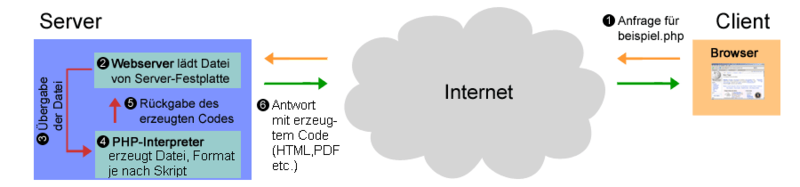
PHP is a server side script language being used for creating
dynamic websites. In contrast to static websites, dynamic websites are
generated at the moment when they are accessed (König, n.d.) . If a
computer users wants to retrieve the website of HTW Chur by entering the domain
www.htwchur.ch. The internet transmits this
request to the corresponding webserver where this information is located. This
webserver looks for appropriate PHP file which is then delivered to the PHP
interpreter. The task of the PHP interpreter is to translate the PHP file into
HTML or CSS language before sending it back to the computer of the user where
the information finally is displayed (Strang, n.d.) .
 |
| Illustration 4, Functionality of PHP (strang n. d.) |
PHP and dynamic websites
As dynamic websites and their content are generated straight
at the moment when they are accessed, its main advantage is its flexibility.
Therefore, PHP is used for websites which depend on their actuality. (König, n.d.)
Thanks to PHP it is possible to separate content and format,
enabling non-experts to up-date content on the website on their own. (König, n.d.)
Application of PHP
This script language is very multifunctional. The basic
requirement for designing a dynamic website is the connection to a database. In
such a database it is possible to store a vast number of information which can
be selected as desired. For example, a company selling clothes online has a
database for all the different articles and all their clients having an online
login. (König, n.d.)
Other areas of applications (Pratzner,
n.d.) :
- Surveys
- Contact forms
- Chats
- Blogs
PHP is able to support a large number of databases which is a
big advantage. Examples for PHP supported databases are among others: MySQL,
Oracle or dBase (Giesbrecht, 2004) .
MariaDB
MariaDB is a very popular database, supported by PHP (mariaDB, n.d.) , server also
being used by Wikipedia for instance. This database turns data into well-structured
information for various types of applications, eg. for a website (MariaDB Foundation, n.d.) .
Sources
S. Deering, “Benefits
of jQuery — SitePoint.” [Online]. Available:
https://www.sitepoint.com/benefits-jquery/. [Accessed: 17-Oct-2017].
“5 Reasons to Use jQuery | Learning jQuery,”
February 16, 2015. [Online]. Available:
http://www.learningjquery.com/2015/02/5-reasons-to-use-jquery. [Accessed:
17-Oct-2017].
S. Chapman, “This Is
What JavaScript Is Used For,” 24th of July, 2017. [Online]. Available:
https://www.thoughtco.com/what-is-javascript-used-for-2037679. [Accessed:
17-Oct-2017].
“HTML tags vs. elements vs. attributes | 456
Berea Street.” [Online]. Available:
http://www.456bereastreet.com/archive/200508/html_tags_vs_elements_vs_attributes/.
[Accessed: 16-Oct-2017].
Web 2.0 / Social Media
/ Social Networks. Charleston, South Carolina, SUA: MultiMedia, 2017.
“Static v Dynamic
Website Design - SpiderWriting Web Design.” [Online]. Available:
http://www.spiderwriting.co.uk/static-dynamic.php. [Accessed: 15-Oct-2017].
Giesbrecht, E. (2004, February
22). www.www-lehre.inf.uos.de. Retrieved October 13, 2017 from
Datenbankanbindung: http://www-lehre.inf.uos.de/wp/2003/nr12b/node23.html
König, M. (n.d.). www.adademie.de.
Retrieved October 13, 2017 from PHP lernen (1): Einführung, Installation und
erste Schritte: http://www.akademie.de/wissen/php-lernen/dynamische-webseiten
MariaDB Foundation. (n.d.).
www.mariadb.org. Retrieved October 14, 2017 from About MariaDB:
https://mariadb.org/about/
mariaDB. (n.d.). www.mariadb.com.
Retrieved October 16, 2017 from MariaDB versus MySQL - Compatibility:
https://mariadb.com/kb/en/library/mariadb-vs-mysql-compatibility/
PHP. (n.d.). www.php.net. Retrieved
October 11, 2017 from Geschichte: http://php.net/manual/de/history.php.php
Pratzner, A. (n.d.). www.php-kurs.com.
Retrieved October 13, 2017 from Möglichkeiten von PHP: https://www.php-kurs.com/anwendungen-php.htm
Seidel, F. (o.D.).
www.php-programmierer.de. Retrieved Octobber 11, 2017 from PHP - eine
Definition: http://www.php-programmierer.de/definition-php/
Software Engineering. (n.d.).
www.softwareengineering.stackexchange.com. Retrieved October 14, 2017 from
Difference between a server and a client:
https://softwareengineering.stackexchange.com/questions/206254/difference-between-a-server-and-a-client/206258
Strang, C. (n.d.).
www.php.lernenhoch2.de. Retrieved October 12, 2017 from Wie funktioniert PHP:
http://php.lernenhoch2.de/lernen/php-einleitung/wie-funktioniert-php/
TechTerms. (2014, April 16).
www.techterms.com. Retrieved October 16, 2017 from Server Definition:
https://techterms.com/definition/server
wiseGEEK. (n.d.). www.wisegeek.org.
Retrieved October 14, 2017 from What is a webserver?:
http://www.wisegeek.org/what-is-a-web-server.htm#didyouknowout

Comments
Post a Comment